
Informatica IDMC Secure Agent Installation Steps
[idmcd@LINUXIDMCDEV ~]$ cd /app/idmcSecureAgent/ [idmcd@LINUXIDMCDEV idmcSecureAgent]$ ls -ltr Download Secure Agent Binaries to Linux Drive: agent64_install_ng_ext.6504.bin [idmcd@LINUXIDMCDEV idmcSecureAgent]$ ./agent64_install_ng_ext.6504.bin -i console Preparing to install Extracting the JRE from the installer archive… Unpacking the JRE… Extracting the installation resources from the installer archive… Configuring the installer for this system’s environment… Launching installer… =============================================================================== Informatica […]
MAT-Matillion Configuration on AWS EC2 Server with Snowflake Database

Matillion Configuration on AWS EC2 Server with Snowflake Database Creating Matillion Instance for Snowflake in AWS: Steps to be followed: 1. Create AWS account 2. Create Snowflake account. 3. Create Matillion Hub Account. 4. Launching Matillion Instance for Snowflake in EC2 AWS Account: 1. 1. Navigate to AWS Console https://console.aws.amazon.com/ 1. Click on “Create […]
MAT – Matillion: Automation – Catalina File Archival

Matillion: Automation – Catalina file Archival For every event happening in Matillion application corresponding logs gets generated in Catalina.out file. As the file size grows more than a permissible limit the performance of the server goes down and may even hang the Matillion process. So to avoid this, Matillion has a built in auto […]
MAT – Matillion : Automation – Restart matillion Services Weekly

Matillion : Automate – Restart matillion Services Weekly Non-PRD Matillion Servers are heavily used by developers daily and there will be many process / connections opened on server level, due to this it will not allow other users to login into system or server performance will be degraded. To resolve this issue admin team has […]
MAT2 – Matillion Upgrade Steps from 1.64.7 to 1.65.8

Matillion Upgrade Steps from 1.64.7 to 1.65.8 Step1: check the current version Go to Helpà about Step 2: take a snapshot backup of existing server in AWS ec2. Then goto Admin à matillioni ETL updates Click on check for updates and follow the steps as guided. Finish the wizard by clicking OK.
MAT1- Matillion Upgrade Steps from 1.54 to 1.59

Step 1: Open Server and get the root access Sudo su – Step2: execute below command to show the current version of Matillion installed # yum list installed Matillion* NOTE: There are 2 files shown. These two files need to be updated for upgrading Matillion. Step 3: Refresh the package present in local yum […]
Informatica 10.5 Installation Steps: Part 4
tar -xf informatica_1050_server_linux-x64.tar :~/software/infa> ls -ltr total 14768476 drwxr-xr-x 2 infadevusers 4096 Mar 18 03:39 Messages drwxr-xr-x 7 infadevusers users 95 Mar 18 03:39 Server -rwxr-xr-x 1 infadevusers users 30014 Mar 18 03:39 install.sh -rw-r–r– 1 infadevusers users 17725 Mar 18 03:39 SilentInput_upgrade_NewConfig.properties -rw-r–r– 1 infadevusers users 8925 Mar 18 03:39 SilentInput_upgrade.properties -rw-r–r– 1 infadevusers users 53153 Mar 18 […]
Informatica 10.5 Installation Steps: Part 3
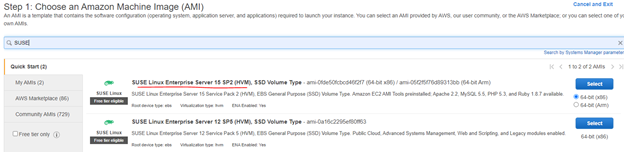
Plan what OS you are planning to install (SUSE Linux, Redhator Windows), also make sure to select instance type (m4, m5…). In below exampleI have selected m5.x4large with 16 CPUs. Step 1: Login to EC2 Step 2 : Launch Instance Create Volume First – in EBS And Attach to new EC2 Instance created […]
Informatica 10.5 Installation Steps: Part 2: Create Keys
Create New Key Pair EC2 Dashboard – Network &Security – Key Pair – Create Key Pair Pem file will be created on local desktop, now using PuttyKeygen convert to ppk (private File). Load file from desktop and say Ok to generate ppk file andSave provide Key.
Informatica 10.5 Installation Steps: Part 1
Part 1: Oracle 19c Database Creation in AWS RDS Creation of Oracle 19c database in AWS Cloud. Check Available Subnet groups in VPC Under Each Group Check available IP Address ?